The Beauty of P

 No doubt you have heard the snobbery in photographic circles when using anything but manual mode when capturing your images. The disdain towards Auto mode even more so. But is this justified or is this merely rhetoric to dissuade from valid uses of camera automation.
Much of the rhetoric comes from the inclusion of Auto mode on point and shoot cameras and the full automation provided on phone cameras. This is not the origination of camera automation. Camera automation started many years ago with the mass market adoption of the Kodak Brownie camera. This camera offered fixed focus and a choice of two to three shutter speeds depending on the model. Film sensitivity was also rated at ASA 80-125 depending on the year of manufacture.
The Kodak Brownie was used by millions of people over its product lifetime. Later camera designers adopted automation over the years to the current day. Today camera automation is more sophisticated and encompassing several additional elements; including auto ISO, shutter speed, f stop and automatic lighting adjustments.
The DSLR and mirrorless cameras of today offer varying levels of automation. There are two primary options for the modern photographer. The first one is the full Auto mode where the camera takes full control of all settings and the photographer does nothing but press the option. The second automation feature offered is the P mode or flexible Program mode. This mode allows the camera to set an optimum setting for exposure but also allows the photographer to vary the settings in either direction via a command dial. This allows the photographer to quickly change f stop or shutter to match the situation but still have the correct exposure.
So why would a serious amateur or professional want to use the P mode on an expensive camera. The answer is simpler than you think. Often in life a fast moving situation presents itself that may interfere with photographic thinking or it is a quickly fleeting moment that must be captured quickly. In the example image you see a massive grizzly bear standing on its hind legs. This is an example of fear interfering with photographic thinking. This shot was possible because the flexible program mode was used to capture the image.
A good practice for a nature or street photographer is to leave your camera in Program mode so that a quick image capture is possible and when time permits then change over to manual or Aperture priority mode. When you are finished shooting simply return the camera to Program mode. This simple practice will let you capture those fleeting moments in life and still delve into more creative settings when using manual mode.
Watsonphotography.ca creates unique images of fashion, models, people, travel, nature and racing sports by Toronto photographer Peter Watson.
Going All In!!!!
 The mainstream media has a tendency to only provide coverage of popular sports, hobbies and pastimes. There is more to life than mainstream interests. Television has created a world of spectators instead of participants. You know who they are; the armchair quarterback, the sofa hog or PC jockey. Typically full of criticism and self-loathing of any activity that is outside the norm or not televised on TV. Thankfully there are people that are outside the norm and do participate in their own hobbies and interests.
Some would call the people that attend FanExpo or Comicon as freaks and weirdos. Look at this from a different angle. They are actively participating in something that they love. This is a far cry from the bench warming activities of the armchair quarterback. In the Gallery you will see people that have a zest for life. We could all learn something from their passion.
Did you ever wonder how they went from a casual hobby or interest to the "All In" just like in Texas Hold Em' poker. In photographic terms they went went from being a snapshot photographer to full "Pro" mode. What they have is passion and commitment. Attendees of Comicon and FanExpo spend months creating their costumes and plan their travel activities around these events. Total commitment and passion. Imagine what would happen to your photography if you had this passion, this drive. Maybe you should attend the next FanExpo or Comicon event to rekindle your desire and drive for photography.
A hint for photographers, you might want to hire a FanExpo or Comicon attendee as your next model. They already know how to hit the poses.
Vintage Motorcycle Racing at Mosport
 The vintage classic motorcycle racing event went off without a hitch on the weekend. Amazing sunshine and legendary vintage motorcycles to peruse in pit lane and to enjoy these fine machines on the track. For those that have not visited this fine festival here is an excerpt from the VRRA web site.
"The Vintage Road Racing Association (VRRA), Canada’s classic and vintage roadracing association, was founded in 1980 by a group of enthusiasts who just wanted to get their treasured machines back on the track. Their avowed purpose: to ensure the preservation of racing motorcycles and to maintain the traditions of racing vintage, and now classic motorcycles in Canada.
The Association has grown and flourished in the ensuing years and now actively promotes four racing events to encourage and expand participation in the sport. The VRRA is the only motorcycle association in Canada devoted solely to classic and vintage road racing – encompassing 1940s to 1980s machines – and is the oldest such organization in North America." http://www.vrra.ca
To fully enjoy the motorcycles and events that the VRRA has put together enjoy the galleries below. Or better yet; attend their next event, you won't be disappointed.
Updated pictures on Racing Life a behind the scenes look at racing.
2015 SuperBike Race

The Super Bike race at the Canadian Tire Motorsport Park was a wildly successful event. Fantastic sunshine and exciting motorcycle racing rounded out the day. The weekend was solidified by the back to back wins by Jordan Szoke of Lynden, Ontario piloting the BMW S1000RR.
As always additions to the Racing Life gallery.
Watsonphotography.ca creates unique images of fashion, models, travel, people and racing sports by the Toronto based photographer Peter Watson.
Photography and Ethics
 This week we have seen some disturbing news coming out of Zimbabwe. Walter J. Palmer of Minnesota has been accused of hunting down and killing Cecil the Lion. Cecil was the much loved and lion patriarch of Hwange National Park. What becomes of Walter J. Palmer remains to be seen. Judging from the swift internet reaction to the event is not likely to be pretty. The internet is very reactionary to the event. In our modern age quite often 15 minutes of internet fame does not translate to long term recognition of the issue.
Other disturbing news has surfaced out of Kenya. Five endangered elephants have been slain so that poachers could cut off their tusks for sale in the illegal trade. This is another example where hunting is not done for food purposes but for purposes that many have labelled as "pyschotic" or "mental".
Killing of Endangered Elephants
What can we do as photographers? The answer lies back in our image catalogs. As our photography skills increase we acquire images that are commercial and can be sold for various purposes. This is where the journey towards image sales becomes fragmented. In our photography perspective with rose colored glasses we tend to view an ideal world. We often think the sale of commercial images of wildlife will result in the publication of images in National Geographic, nature magazines, fine art prints or calendars.
This is far from the truth. Commercial images from stock agencies are quite often purchased by hunting magazines. The total revenue last year for books and magazines devoted to hunting was $124,313,000. These magazines perpetuate the ruthless slaughter of defenseless animals. Whether they are in the wilderness, national parks or game preserves. These animals do not have a knife, crossbow or gun to defend themselves.

** Google screen shot of typical hunting magazines.
Photographers can make a stand and make an ethical and moral choice on the subject or they can go after commercial profit. The choice is up to them. You can enforce commercial sales contracts of your images and stipulate they are only for nature, environmental, fine art print, calendar or you can donate your images to animal preservation causes.
We all face ethical and moral decisions in our lives. The time is now to make a stand and refuse to sell our images to commercial hunting publications.
Ricky Gervais has summed it up the best.
"It's not for food. It's not the shooting, or tin cans would do. It must just be the thrill of killing. Mental. "
Not all photographers license their images for commercial purposes. There is still something that we can do to stop "trophy" hunting.
- Communicate with your local legislative or government representative and motivate them to draft legislation to deny the transport of trophy animals over international borders.
- Buy stock in major international airlines and become a shareholder activist. In the annual general meeting for stockholders submit a proposal to shareholders to prohibit the transport of of trophy animals.
- Step up to the plate and book a "photo" safari to Africa. You can do this by supporting organizations and outfits that actively support the conservation of wildlife. Don't believe anything the trophy hunting community tells you. Less than 3 % of trophy hunting fees went to conservation. 97% went to lines the pockets of corrupt guides and officials. Photo safarism is the way to go.
Update: A number of airlines including Air Canada, Delta, American and United Airlines announced they will no longer ship big-game animal carcasses, or 'trophies', for hunters who want to bring their kill home. Other airlines are expected to follow suit in the near future.
Image credit: CBS news
Watsonphotography.ca creates unique images of fashion, models, travel, people and racing sports by the Toronto based photographer Peter Watson.
Preserving your Past, Present and Future
The new generation of photographers has embraced digital imaging but the use of digital cameras comes with a price. The price we pay for this incredible technology is the potential loss of images by retaining the images in a digital form. Before we jump on what this really means; let's have a look at some analogue technology. The film medium has been well understood for many generations of photographers. There are established archiving methods for long term storage. The only caveat here is that the preservation of film negatives is not straightforward under average conditions. We have to remember that the preservation of film negatives by the Smithsonian or by the National Archives is done through exacting methods. The average person does not have access to archival temperature controlled vaults.
The average analogue film photographer who has amassed a great number of negatives over the years would have taken some degree of care when storing the negatives. This would entail storing the negatives in special sleeves and storing them inside of a larger storage container. The environment would be temperature controlled through residential air conditioning; but not too archival standards. The storage conditions can affect the longevity of your negatives but there are other conditions in play here. Two factors that have a bigger impact are the quality of the original film stock and adherance to quality control standards during film processing.
As a general rule black and white negative films will survive the longest, professional color slide/film stock comes in second and last is consumer quality film. Film that was processed in a professional quality lab will last the longest and film that was processed in a 60 minute photo lab will noticeably deteriorate in 25 to 30 years. Let's look at some example images taken in the 1980's.
|
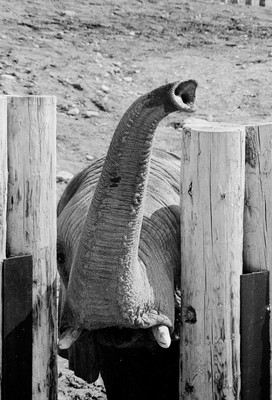
This image was taken at the Toronto Zoo at the elephant compound. The elephants at the zoo have now been moved to an elephant sanctuary. This image was taken with Ilford HP5 black and white negative film. The negative has stood up very well over the years. This negative will likely survive longer than its creator. |

|
This image was taken on Kodak Ektar 125. This film was oriented towards the professional market and was manufactured with higher quality materials and quality assurance standards. This film was processed in a professional color lab and has stood up very well to the test of time. Little to no color fading or degradation of the negative. |
|
|
In this example we have an image taken on Kodak 100 consumer film in the early 1980's. It was processed in a 60 minute color lab and the negative shows signs of age. Color fading and physical degradation of the negative are clearly shown. |

The examples shown above clearly illustrate that the average film photographer may face challenges when storing negatives over decades. Physical prints are similar in nature. Black and white prints will last the longest. Color prints processed in a professional lab will last the longest with due care of the print. Prints that were created in a 60 minute photo lab or exposed to sunlight will exhibit color fading and physical deterioration over time.
Digital photographers reading this right now are rejoicing and reaffirming their beliefs that digital is the perfect medium. Not so fast. The storage of digital image files presents its own unique issues that need to be addressed. Digital photographers probably know the basics. Create a backup copy and store another copy off site. This should cover off most of the disaster recovery scenarios that the average person would encounter. If you are diligent you have included cloud storage for your most valuable images.
The issue with storing digital image files lies with the degradation of magnetic media over time. Every disk drive; whether they are consumer or enterprise level disk drives will experience read errors that increase with the lifetime of the disk drive. What this means that you may experience corruption issues on your image files the longer they are stored on the magnetic media. In the analogue film world your negatives may physically deteriorate and you may still have some ability to recover a usable images. With digital storage once corruption occurs there may be no recovery. This is why you see the emergence of storage management methods for consumers in the form of Windows storage pools and ZFS.
Bottom line is that digital photographers have to realize the limitations of digital storage and how to manage archival storage of digital files going forward for many years. The alternative is to print your images out on archival paper and hope for the best.
Some reading material to educate yourself on digital storage issues and archival management.
Long Term Statistics for Disk Drives
Looking at New Storage Technologies
Looking at Digital Archiving Issues
Watsonphotography.ca creates unique images of fashion, models, travel, people and racing sports by the Toronto based photographer Peter Watson.
Speeding Up Lightroom Workflow
There are many raw processors on the market. The major players are Capture One, DxOptics and the industry goliath being led by Adobe with Lightroom/Photoshop combination. Those photographers that use Lightroom/Photoshop understand that Lightroom has a specific weakness in the time it takes to ingest and render images. High volume sports, events and wedding photographers have long endured the lengthy times before they are able to start their post-processing editing workflow on Lightroom.
Photographers who have upgraded Lightroom over successive versions have no doubt pursued the available performance and tuning options for their systems. The introduction of Lightroom 6 has sped up the workflow to some degree but a high volume of images can still take hours to ingest and render. Let’s look at some numbers in more details. A day of shooting at the race track can quickly lead to 2000+ images that need to be copied over to your system and cranked through Lightroom. In my case this will typically take two to three hours before Lightroom has ingested and rendered the images. This is on a highly optimized PC with dual SSD’s, current Intel processor, 16 gb of memory and USB 3 disk drives.
Lucky for us, some smart folks have come up with some solutions to help speed up this kind of workflow. In this article we will look at two products; PerfectBrowse and Fast Raw Viewer. Photo Mechanic has a similar functionality but its intended market is different. It is oriented towards professional shooters and photo journalists who may be working with in-house or external staff whose function is to cull and process at high speeds with specific deadlines for publication. PerfectBrowse and Fast Raw Viewer are predominantly suitable for the serious amateur and professional photographer who looks after their own workflow.
Pefect Browse from OnOne


Both products have specific workflows to help speed up your overall imaging workflow and integration with Lightroom. These products work by being able to render a RAW image in under a ½ second. This will allow you to make your initial sorting selection and culling to go much faster. Once you have made your selections you can then start with your Lightroom workflow. Fast Raw viewer changes your workflow by letting you make selections and then copy the RAW image over to a target folder. In Lightroom you select this target folder to further ingest/render and edit your final selections. Perfect Browse works a little bit different by allowing you to make selections in the culling process and then apply filters based upon your selection criteria (Pick or Stars). The selected images can then be sent over to Lightroom to permit the final ingestion/render and edit of your final selections.
Let’s look at some hard numbers on the impact to workflow. The standard Lightroom workflow can take over 3 hours to ingest and render 2,000 images. (based upon Nikon D810 raw images approximately 32-40 mb in size) At this point you can start your selection and culling process. This part of the process can take me approximately 1 to 1 ½ hours to complete. Once my final selections have been made virtual copies are made and stored in a Lightroom collection. Eg. RacingEvent-EditSelections. Somewhere around the 4 hour mark I can start my actual Lightroom edits of my selections. This will be around 100 images from a race day.
Now let’s look at our modified workflow using Perfect Browse. The first part of the process is to copy the images from the memory cards via a USB3 card reader over to the USB3 disk drive. This will take approximately 30 minutes to perform. I then startup Perfect Browse and start my selection and culling process. This will take me 1 to 1 ½ hours to complete. At the end of this I have made 100 selections which I then send to Lightroom. Lightroom will then ingest and render the images which will take approximately 18-20 minutes. The net benefit of this workflow is that I can start my actual editing at somewhere around the 2 hour mark. The net benefit of using this workflow can easily save you hours which can make or break things if you have tight deadlines to honor. A side benefit of this workflow is that you can keep your Lightroom catalog down to a manageable size.
Now that we understand the time savings and adjustments to workflow we can now examine which product is right for you Fast Raw Viewer or Perfect Browse. Every photographer has specific genres they like to photograph and also a specific workflow that they are comfortable with. There is no one size fits all or perfect choice here. You need to pick something that best matches with your requirements. So let’s look at the pros and cons of each product in the comparison tables below:
|
Feature/Benefit |
Perfect Browse |
Fast Raw Viewer |
|
Speed up workflow |
ü |
ü |
|
External editor support/Lightroom integration |
ü |
X |
|
Standardized culling/sorting/filtering |
ü |
ü |
|
Reject tracking and management |
X |
ü |
|
Colour accuracy checking |
X |
ü |
|
Apply pre-edits prior to post-processing editors |
X |
ü |
|
Raw vs. jpg comparison |
X |
ü |
|
Windows/Apple support |
ü |
ü |
|
Broad support for camera RAW formats |
X |
ü |
|
Optional cloud integration |
ü |
X |
Both products offer the photographer a faster workflow and are worthwhile if you have to deal with a high volume of images. The cost is modest or free depending upon your choice. My recommendation would be to use Perfect Browse if you have generalized requirements or you shoot sports. Fast Raw Viewer is the better choice if you shoot weddings or do critical studio work. Both products use the Open GL on your video card to speed up the image viewing process. Lightroom 6 uses the same methodology to speed up the Develop module. I would expect that the next update to Lightroom will use the same methodology to speed up this part of the workflow. In the interim this gives time for the developers of Perfect Browse and Fast Raw viewer to enhance their products further.
Fast Raw Viewer is available for $14.95 at http://www.fastrawviewer.com/
Perfect Browse 9.5 is currently free through this special link. http://www.on1.com/fstoppers/
Watsonphotography.ca creates unique images of fashion, models, travel, people and racing sports by the Toronto based photographer Peter Watson.
Danger: Sharp Curves Ahead

Have you ever entered a photo competition or a critiqued review of your images and wondered about the results. Been pondering the results ever since? So let’s start at the beginning. What is the purpose of photo contests? The purposes will generally vary from promotion of local talent, contributions towards the arts or a shameless grab on obtaining copyrighted material for less than commercial value. Yes, there are photo contests out there without scruples. So how do you sort out a good photo competition from a bad one? Below are some of the major considerations to think about before entering.
-
Look for a contest with a diverse range of categories and scoring.
A competition with a wide range of categories and defined scoring and range of awards will attract a wide range of entries. This will allow you to determine a general form of ranking against other photographers from different locales and genres. A competition that provides feedback at the higher levels will help you improve your “game”. Look for additional categories and specialization. Some examples of this are:
- Nature
- Cityscape/Landscape
- Sports
- Digital Art
- Portrait
- Photojournalism
- Professional/Amateur/Youth
-
Know your rights as a photographer.
Before entering in any competition a little research is the best direction. The first stop to educate yourself by reviewing your rights as a photographer at http://www.artists-bill-of-rights.com.
All competitions should be researched thoroughly. Some key points to look for are:
- A competition that takes excessive rights for the images submitted is a disguise for a thinly veiled attempt to obtain images for commercial purposes with little or no payment to the photographer.
- Hidden fees or extras where the photographer is required to make a payment for the framing and display of the images.
- The awarding of taxes; either monetary or products may incur income taxes depending on your country of residence.
-
Qualification of the judges
The first thing you need to be aware of is that all judges exhibit some form of bias when judging images. The degree of judging bias (sub-conscious or conscious) is based upon the judge’s life experiences, preferences on subject matter and specific types of cognitive bias. They may claim that they did not express bias when judging images but it is very well documented in research papers how bias is displayed in competitions. This is apparent in some sporting competitions and some organizations have taken major steps to try and address judging bias. Bias may not be intentional by the judges but it is very real. As part of your research on a photo competition here are some things to look at and consider:
-
Judges should have formal education in the category they are judging or be considered to be in the top 5% in their field. Learning how to be a judge in a two hour training course could signal issues with judging decisions.
-
Review the previous year’s winners in your chosen category. Compare these results with recognized international photo competitions. This will give you an idea if the judges are exhibiting bias or a predisposition towards a certain type of image. For example if you are entering the Nature category and your analysis indicates that the winning images were 60% related to ornithology and a recognized international photo competition has statistics that showed only 10%; this would indicate a possible indication of judging bias. A good reference source for comparative research would be:
http://blog.photoshelter.com/2012/09/are-photography-contests-worthwhile-or-worthless/
http://www.nikon-photocontest.com/en/
http://rationalwiki.org/wiki/List_of_cognitive_biases
-
Entry fees should pay for costs that leads to a benefit.
The logistics of running a major photo competition can incur some major costs. Fees are an important barrier to entry for a contest, because the limit entries only to the most serious and discourage the frivolous. You should look at where the fees are being consumed by the organizers and what benefits they bring to the competitors. Look for competitions that publicize the winners in various media such as internet sites, press releases, publications out to industry creatives and gallery showings.
Good luck on your future participation in a photo competition. Your journey now doubt will be illuminating for you.
A final word:
Brother, you better watch out for the skin deep
The Stranglers
Aural Sculpture
https://www.youtube.com/watch?v=j5UfE2BbYSQ
Watsonphotography.ca creates unique images of fashion, models, travel, people and racing sports by the Toronto based photographer Peter Watson.
De-constructing your photo shoot
Today we look at some humour on the various photo shoot styles. As with any shooting technique it is always best to go with the style that gets you the best results or maybe this is the time to branch out a bit and try something else.
As you drive down the road in your car with the stereo blazing away to your favorite tunes; a thought pops into your head. What would it be like to meet a rock star? What are they really like? Do they snap their fingers to music in the car like you do? Do you play the drums or guitar as well as they do?
What actually happens when you meet that photographic rock star? That famous photographer that you revered and thought highly of when looking at gallery showings, publications and reading those in-depth interviews in a photography magazine.
Do you wobble at the knees, stammer a question, break into a cold sweat or freeze with fear. Probably none of the above. Your shyness has probably held you back as you listen to others pose a few questions. As you listen to your rock star you realize the differences are not as great as you think they are. What is it that differentiates some of the great photographers and how they construct a photo shoot? It mainly comes down to different styles. You need to find your own style. Identify where you are and expand beyond it.
As we look at photo shoot styles there three predominant types. 1. FUBAR 2. Anal Technophobe 3. Crocodile. Each method has merits or drawbacks. Let’s examine these in more detail from a tongue and cheek perspective.
FUBAR

Far more wide spread than you think. Some of the camouflage techniques that a FUBAR uses is to disguise themselves in modern accoutrements and technology. Yet basic photography technique may elude them. You may recognize them as MWC (Mom with Camera), DID (Dentist in Disguise) or the revered Uncle Bob at a family wedding.
The warning signs that a FUBAR is close by and conducting a photo shoot may be the steady staccato of a camera shutter, sounds of anger when chimping the camera display or outright hostility when their subjects do not pose correctly.
A FUBAR may bang off an occasional good frame which may make the pedantic masses happy and extend their dreams of a photographic livelihood. What is missing from the FUBAR technique? Keep reading about the other styles to find out.
Anal Technophobe

This is a category that is unique and is more obvious than others. You may have seen it before; but you often walked past because you thought the photographer just had a passion for art. There are obvious signs in this category. This is what you need to look for:
- Tends to exhibit a sour puss look which shadows their views on life. This quite often transcends into their photography and they cannot understand why they cannot capture the joys in life.
- The excessive looks at Liveview, recomposing, then Liveview and chimp again.
- Expressive looks and frequent utterances of the F word.
- Quite often misses the real moment in portraiture and sports.
- Cannot understand why they score so low in photo competitions.
- Often dismiss other photographers as incompetent.
- Occasionally they proffer up an image that shows photographic brilliance.
As a general rule of thumb they do not offer constructive advice or provide commentary on their images or technique. Their feedback directed at other photographers can quite often visceral and exhibit troll like behaviour. Life is too short to deal with the verbal abuse. Move away quickly when you encounter this.
The Alligator

This is often what you miss when you watch other photographers. It is often portrayed as the quick shot or the re-examination of a particular look. They recognize the shot and then move in to explore this in more detail. A lot of photographers will dismiss other photographers merely because they did not see what the other photographer saw. There are some telltale signs to recognize this shooting style. Look for these obvious signs:
- The re-examination of a particular look and specific direction to the model to “rewind”.
- Putting down the camera and announcing that it is a “wrap”.
- A sense of confidence displayed when the shot was nailed.
- The final image conveys a sense of emotion and feeling. Sort of like that feeling you get when you watch an Oscar nominated movie. It transports you to a time and place and makes you feel like you are there almost like an innocent bystander.
If you really wish to improve your shooting style the best advice is to invest time and money in formal photographic education and good quality photography workshops. You may have heard of the concept of mentoring in the business world. Give it a try. Seek out a more experienced photographer and work on a mentor/mentee relationship to improve your game.
Watsonphotography.ca creates unique images of fashion, models, travel, people and racing sports by the Toronto based photographer Peter Watson.
Evolution of the Snapshot
 As you move around the photographic community and traverse the public landscape you see an astonishing amount of people using smartphones for snapshots and selfies. The proliferation of people taking snapshots is exploding. Or is it? Yes, statistically it is increasing as is all forms of digital artifacts from our modern age.
The proliferation of snapshots in the general public raises the visibility of photography. Too many in the photographic community look with disdain at smart phone photographers and causal snapshot takers. This disdain often extends to outright snobbery and elitism against snapshots. Is there justification for these viewpoints towards snapshots or is this simply an issue of illumination.
I think the main reason for the disdain and snobbery towards smart phone photographers and the causal snapshot taker is just ignorance about photographic history.
The use of cameras to take snapshots goes back to the introduction of the Kodak #1 camera in 1888. Invented and marketed by George Eastman. The Kodak # 1 was a simple box camera that came pre-loaded with a 100-exposure roll of film. After the roll was exposed, the camera was sent back to the factory in Rochester, New York. The film was processed and returned to the customer with the prints and a fresh roll of film installed in the camera.
Technical advances by the introduction of the Kodak # 1 were surpassed by George Eastman's skill in his marketing strategy. By simplifying photography and providing a
 service for the consumer, he made photography accessible to the public. The marketing slogan for this camera was “You press the button, we do the rest." It is very easy to draw parallels between the marketing magic of George Eastman with that of Apple Corp. when they introduced the first iPhone to the market.
After the introduction of the Kodak # 1; photography for the masses increased exponentially. Snapshot photography became a national craze and ten years later in 1898 over 1.5 million roll-film cameras were in the hands of the public to take snapshots.
The early use of taking snapshots was meant to record important events in life. Typically this would entail snapshots of weddings, graduations, birthdays, travels and family get-togethers and to capture the introduction of changes to lifestyle with the introduction of pets, cars, and houses and the rearing of children.
Snapshots were often placed into family albums and were periodically added to. Family albums were often arranged by historical or narrative sequences that painted a vivid history of family life. Even though 100 years of passed the only difference in the curation of snapshots is in the display medium. Instead of family photo albums; snapshots are now arranged in web galleries of posted for display on social media.
The focus on snapshots has continued and evolved with each successive introduction in photographic technology over the past 125 years. The list below shows the evolution of camera technology used by the public in taking snapshots. I think George Eastman would be proud of the continuing tradition of using snapshots to capture the moments in our lives.
1. Kodak # 1
2. Kodak Brownie
3. Folding camera
4. 35 mm rangefinder
5. Kodak 126 film and cameras
6. Kodak 110 cameras
7. Polaroid
8. Point and shoot film cameras
9. Digital point and shoot
10. Smart phone
A future Part two article will discuss workflow techniques for smartphones. Stay tuned.
Images courtesy of Watsonphotography.ca and Cistrone Photography. Images captures on Apple and Blackberry smart phones.
Watsonphotography.ca creates unique images of fashion, models, travel, people and racing sports by the Toronto based photographer Peter Watson.